What Is VPN Passthrough? A Simple Guide for 2026
Your work VPN connects fine on your phone’s mobile data but dies on your home Wi-Fi. In your router’s settings you spot three checkboxes labeled PPTP, L2TP, and IPsec passthrough. This guide answers what is vpn passthrough in plain language: what those toggles do and whether you still need them in 2026.
Quick Answer
VPN passthrough is a router setting that lets VPN traffic pass through your router’s NAT (Network Address Translation) firewall. It matters mainly for older VPN protocols like PPTP, L2TP, and IPsec, which routers can otherwise block because they do not carry the port information NAT expects. On most modern routers it is enabled by default, and modern VPN apps do not need it at all. It is not the same as running a VPN on your router, which protects your whole network instead.
Quick Answer: What Is VPN Passthrough?
Think of your router as a reception desk for your home network. Every device in your house shares one public IP address, and the router’s NAT system keeps track of which incoming data belongs to which device. It does this by looking at port numbers attached to each connection, like room numbers on a mail envelope.
The problem is that some older VPN protocols do not use those port numbers in a way NAT understands. PPTP wraps its data in a format called GRE, and IPsec uses one called ESP. Neither carries the port information the router expects, so it cannot tell where the returning data should go and simply drops the connection.
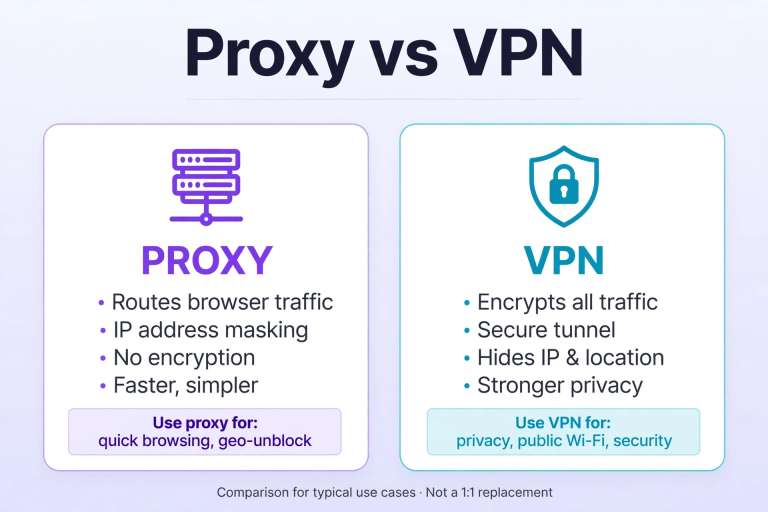
In short, what is vpn passthrough but a compatibility workaround: the router recognizes these specific protocols and routes their packets to the right device instead of blocking them. It encrypts nothing and creates no VPN connection. If you are weighing privacy tools more broadly, our proxy vs VPN comparison explains when each one makes sense.
Why VPN Passthrough Exists: The NAT Problem
To understand why this feature was ever needed, you have to know about IPv4 address exhaustion. The original addressing system only allows about 4.3 billion unique addresses, which ran out years ago as billions of devices came online. The industry’s answer was NAT: let one public IP address serve an entire household, with the router sorting traffic internally by port number.
But VPN protocols were designed before NAT became universal. PPTP dates back to the 1990s, and IPsec and L2TP were built for direct connections between networks, not for squeezing through a home router’s address translator. Passthrough was the bridge between these two eras, and it still sits in router settings today, mostly as a legacy option.
VPN Passthrough vs VPN on a Router: A Common Confusion
These two sound alike but do completely different things, and mixing them up is the most common misunderstanding about passthrough:
- VPN passthrough: A passive setting. It allows a VPN connection started on one of your devices, like your laptop or phone, to travel through the router to reach a VPN server on the internet. The router itself is not running any VPN software.
- VPN on a router (VPN client mode): An active setup. The router itself connects to the VPN server, and every device on your network gets VPN protection automatically, with no app needed on each device.
- VPN server on a router: Yet another feature, which lets you connect back into your home network from outside. Passthrough has nothing to do with this either.
If you only want your laptop’s VPN app to work over home Wi-Fi, passthrough is the relevant setting. If you want every device in the house protected without installing apps on each, that is a VPN router setup, a different feature entirely.
The 3 Protocols Passthrough Was Built For
Router settings pages typically list three separate passthrough toggles, one per protocol:
1. PPTP Passthrough
PPTP (Point-to-Point Tunneling Protocol) is the oldest of the three and the main reason passthrough exists. It is also dead as a security tool: its encryption was broken years ago, and no one should use PPTP for anything sensitive in 2026. Its toggle remains only for ancient corporate systems that never upgraded.
2. L2TP Passthrough
L2TP (Layer 2 Tunneling Protocol) does not encrypt on its own and is almost always paired with IPsec. It connected branch offices and remote workers for years, and its passthrough toggle helped those connections survive home and small-office routers.
3. IPsec Passthrough
IPsec is the most legitimate survivor of the three. It still powers many corporate VPNs and site-to-site connections. If you work from home and your company’s VPN uses IPsec, this is the toggle that keeps your work connection alive through your home router.
WireGuard, OpenVPN, and IKEv2 were all designed with NAT in mind and pass through routers without any special setting. If your VPN app uses any of these, and nearly all current apps do, passthrough is irrelevant to you. (If your VPN keeps disconnecting on specific networks, our guide on how to turn off VPN and reconnect cleanly covers the quickest reset steps.)
How to Enable VPN Passthrough on Your Router
On almost every router sold in the last decade, passthrough is already enabled by default. You only need to touch it if your VPN fails specifically on home Wi-Fi while working fine on mobile data. The generic process looks similar on TP-Link, Netgear, Asus, Linksys, and most ISP-provided routers. For brand-specific screenshots, ASUS’s official NAT passthrough guide walks through the exact menu on its routers.
- Open a browser and go to your router’s admin page. This is usually 192.168.1.1 or 192.168.0.1. Log in with the admin username and password, often printed on a sticker on the router itself.
- Look for a section called VPN, Security, Advanced Settings, or NAT. Inside it you should find VPN Passthrough or ALG (Application Layer Gateway) settings.
- You will see individual checkboxes for PPTP Passthrough, L2TP Passthrough, and IPsec Passthrough. Check the one matching the protocol your VPN uses. When in doubt, enabling all three is harmless.
- Click Save or Apply, then restart the router. Reconnect your device’s VPN and test the connection.

Do You Still Need VPN Passthrough in 2026?
For most people, the honest answer is no. Three things have made it largely obsolete:
- Modern protocols do not need it. WireGuard and OpenVPN traverse NAT cleanly, and every major consumer VPN app switched to them years ago.
- It ships enabled by default. Router makers turned it on out of the box long ago, so it already works silently in the background.
- The old protocols are dying. PPTP is a security relic, and even L2TP/IPsec is being replaced by WireGuard in new deployments.
The exceptions are specific: a workplace VPN still on IPsec, a router from before 2010, or an ISP gateway with aggressive firewall defaults. Otherwise, you can safely forget this setting exists.
One security note: passthrough slightly weakens your router’s firewall posture for those protocols. There is no reason to enable the PPTP toggle “just in case” if nothing on your network uses PPTP. Leave unused toggles off.
Troubleshooting: VPN Works on Mobile Data but Not on Home Wi-Fi
This is the classic symptom of a passthrough problem. Work through these in order:
- Check the passthrough toggles. Log in to your router and confirm the passthrough checkbox matching your VPN’s protocol is enabled, then reboot the router.
- Find out which protocol your VPN uses. Open your VPN app’s settings and look for the protocol option. If it says WireGuard or OpenVPN, passthrough is not your problem, so skip to the next step.
- Test with a different protocol. Temporarily switch your VPN app to OpenVPN or WireGuard. If the connection works, your router was blocking the old protocol and the passthrough setting needs attention.
- Check for double NAT. If you have your ISP’s modem-router plus your own router plugged into it, traffic passes through two NAT layers. Put the ISP device in bridge mode or enable passthrough on both devices, and update the router firmware while you are in there, since old firmware has buggy ALG implementations.
FAQs About VPN Passthrough
What is VPN passthrough in simple terms?
A router setting that lets old VPN protocols (PPTP, L2TP, IPsec) pass through the router’s NAT firewall. Without it, the router can block those connections because they do not use standard port numbers.
Should VPN passthrough be on or off?
Leave it on if anything on your network uses PPTP, L2TP, or IPsec, such as a workplace VPN. If every device uses a modern VPN app, the setting does nothing either way, so leaving the defaults is fine.
Is VPN passthrough safe?
Yes, for normal use. It does not expose your network; it only lets recognized VPN protocol traffic pass the firewall. As a matter of hygiene, disable the toggles for protocols you do not use, particularly PPTP.
Does VPN passthrough slow down my internet?
No. It adds no encryption and no extra routing hops; it only changes how the router classifies certain packets. Any speed difference comes from the VPN itself, not the passthrough setting.
What is the difference between VPN passthrough and port forwarding?
Port forwarding opens a specific port so inbound connections can reach one device, like a game server. VPN passthrough handles outbound VPN traffic that does not use standard ports at all. They solve different problems and are configured in different menus.
Why does my VPN work on mobile data but not on Wi-Fi?
Your cellular carrier’s network does not block those protocols, but your home router’s NAT might. Enabling the matching passthrough toggle (usually IPsec) on your router is the first fix to try.
Final Thoughts
So what is vpn passthrough? A quiet router feature working in the background: letting older VPN protocols survive in a world of NAT. Most of the time you will never touch it, because it ships enabled and modern protocols do not need it. But when a work VPN mysteriously fails on home Wi-Fi while working everywhere else, those three little checkboxes are the first place to look.