Free VPN for PC: 7 Safe Picks for Windows in 2026
Looking for a free vpn for pc that will not put your data at risk? You are not alone. Plenty of Windows users want basic privacy protection without paying for a monthly subscription, but the free VPN market is crowded with sketchy apps that log browsing habits and flood you with ads. The good news is that a handful of trusted VPN companies offer genuinely safe free tiers with real encryption and clear privacy policies. In this guide, you will learn when a free VPN makes sense, which risks to avoid, and which free PC VPN options are worth your time in 2026. We will also walk you through installing one on Windows in just a few minutes.
Quick Answer
A free VPN for PC is safe when it comes from a reputable provider with a published no-logs policy and real encryption. Proton VPN Free, Windscribe, TunnelBear, PrivadoVPN, Hide.me, and Hotspot Shield all run free tiers backed by paid businesses, which is a good sign. Steer clear of unknown free VPN apps with no company details or privacy policy. Free plans always have limits, such as data caps and fewer servers, so check the provider’s site for current limits before you download.
Key Takeaways
- A free vpn for pc works best for light use, such as public Wi-Fi protection and everyday privacy.
- The safest free plans come from well-known companies that also sell paid VPN subscriptions.
- Shady free VPNs can log your activity or show heavy ads, so read the privacy policy first.
- Expect limits on free plans, including data caps and a small choice of server locations.
- You can set up a free VPN on a Windows PC in about five minutes with an official app.
Why Use a Free VPN for PC?
Your PC connects to networks you do not control. Coffee shops, hotels, airports, and campus Wi-Fi are convenient, but open networks make it easier for snoopers to watch unencrypted traffic. A free VPN for PC encrypts your connection on these networks, which is the single biggest reason to install one.
There are other perks too. A VPN hides your IP address from the websites you visit, which cuts down on tracking. Some people also use a PC VPN to reach content that is blocked on their local network, such as at school or work.
A free tier is also a smart way to test drive a VPN before you pay. You get a feel for the app, the speed, and the features, and you can upgrade later if you need more. If you travel with your phone too, our guide on setting up a VPN for iPhone shows how to protect iOS the same way.
Is a Free VPN for PC Safe?
A free VPN for PC can be perfectly safe, but it depends on who runs it. Running VPN servers costs real money, so always ask how the free plan is funded. Reputable providers pay for their free tiers with revenue from paying customers, which keeps their incentives honest.
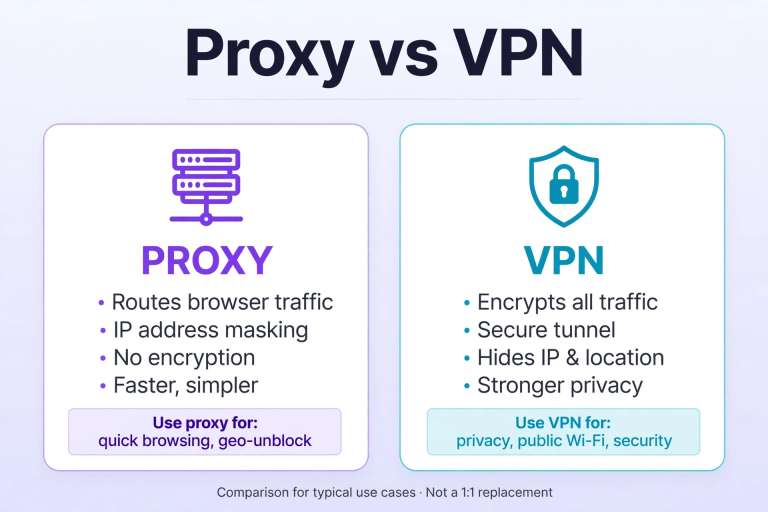
Watch for red flags instead. If an app has no named company, no privacy policy, no website you can verify, or a flood of aggressive ads, do not install it. Curious about the technical difference between these tools? Our proxy vs VPN comparison explains it side by side.
Warning
Some shady free VPNs have been caught logging user activity and selling the data to advertisers. Others inject ads into your browsing. Protect yourself by sticking to well-known providers with published no-logs policies, and uninstall any free VPN that asks for strange permissions or behaves oddly.
7 Best Free VPN Options for PC in 2026
Every option below comes from an established VPN company with a real business behind it. Free plans change over time, so check the provider’s site for current limits before you commit.
- Proton VPN Free comes from the team behind Proton Mail and is built around a strict no-logs policy and open-source apps. It is one of the most trusted names in the free VPN space. Check the provider’s site for current limits.
- Windscribe offers a polished Windows app with a generous free tier and useful extras like an ad blocker. It is a strong pick for everyday browsing protection. Check the provider’s site for current limits.
- TunnelBear is known for its friendly design and independent security audits, which is rare among free VPNs. The free plan is simple and great for beginners. Check the provider’s site for current limits.
- PrivadoVPN pairs a no-logs policy with easy Windows apps and decent speeds for casual use. It is a solid all-rounder if you want something simple. Check the provider’s site for current limits.
- Hide.me gives advanced users plenty of settings to play with while keeping a no-logs promise. Its free plan works well on Windows for light daily use. Check the provider’s site for current limits.
- Hotspot Shield has been around for years and offers a free tier with one-click connect. It suits anyone who wants the simplest possible setup. Check the provider’s site for current limits.
- The Opera browser includes a free built-in VPN for your browsing sessions. It only protects traffic inside the browser rather than your whole PC, but it is handy for quick use. Check the provider’s site for current limits.
How to Set Up a Free VPN on Your Windows PC
Installing a free VPN on your PC takes about five minutes. Follow these steps:
- Choose a provider from the list above and visit its official website. Never download a VPN installer from a random file-sharing site.
- Download the Windows app and run the installer. Accept the defaults and follow the on-screen steps.
- Create a free account with your email address, then sign in to the app.
- Pick a server location. A server close to your real location is usually the fastest.
- Click Connect. Your free VPN for PC is now active and encrypting your traffic.
Need to disconnect later? Our guide on how to turn off VPN walks you through it on Windows, Mac, iPhone, and Android.
Free VPN for PC vs Paid VPN: What’s the Difference?
Free and paid VPNs do the same basic job, but paid plans remove the limits that free tiers live with. Here is how they usually compare:
| Feature | Free VPN for PC | Paid VPN for PC |
|---|---|---|
| Monthly cost | $0 | A few dollars per month |
| Speed | Often slower on crowded servers | Fast, high-bandwidth servers |
| Data allowance | Usually capped | Unlimited |
| Server locations | A handful of countries | Dozens of countries |
| Streaming | Rarely reliable | Usually works well |
| Privacy policy | Varies, always check | No-logs policies are common |
If you only need protection on public Wi-Fi now and then, a reputable free VPN for PC is fine. If you stream, game, or work remotely every day, a paid plan is usually worth the small cost.
Common Free VPN Problems on PC and How to Fix Them
Free VPNs are handy, but they can be fussy. Here are the most common issues and quick fixes.
Slow speed. Try a server closer to you, switch the VPN protocol in the app settings, or reconnect. Free servers get crowded at peak hours, so try again later if needed.
It will not connect. Check that your firewall or antivirus is not blocking the app, then restart the VPN and your PC. If it still fails, reinstall the app from the official site.
Blocked websites. Some sites block known VPN IP addresses. Switch to a different server location, or turn the VPN off briefly for that site if you trust it.
Pro Tip
Test your base internet speed with the VPN turned off first. If your raw connection is slow, no free VPN for PC can fix that. Also keep the app updated, since providers regularly fix connection bugs in new releases.
Frequently Asked Questions
Is a free VPN for PC really free?
Yes, but a free plan is a limited version of a paid product. Reputable providers fund it with revenue from paying subscribers, which is why their free tiers are trustworthy. Always check what the limits are before you download.
Can a free VPN sell my data?
A shady one can, which is why the provider matters so much. Stick to well-known companies with published no-logs policies, and avoid apps with no company details. When in doubt, pick one from the list in this guide.
Is using a VPN legal?
Yes, VPNs are legal in the United States and most countries. A few countries restrict or ban them, so check your local laws if you travel.
Will a VPN slow down my PC?
Encryption adds a small speed cost, usually barely noticeable on a good connection. If everything feels much slower, switch to a closer server or a less crowded one.
Can I stream with a free VPN?
Usually not reliably. Streaming services actively block VPN IP addresses, and free servers are the first to get flagged. Paid plans with dedicated streaming servers work far better.
Do I still need antivirus?
Yes. A VPN encrypts your traffic and hides your IP, but it does not scan downloads or block malware. Keep your antivirus running alongside your VPN.
Final Thoughts
A free vpn for pc is a great starting point for better privacy on Windows, as long as you choose a provider you can trust. Stick to the well-known names in this guide, read the privacy policy, and remember that free plans come with limits.
Want the same protection on your phone? Check out our VPN for iPhone guide to get set up on iOS in minutes. And if you ever decide free is not enough, upgrading to a paid plan from the same provider takes seconds.