What Is Cloud Storage? A Simple Guide for 2026
Your phone says storage is almost full. A friend tells you to just put it in the cloud. Your office mentions moving everything to cloud storage. You have heard the term a hundred times, but what is cloud storage really, and why does everyone assume you already know the answer?
This guide answers what is cloud storage in plain language, no jargon: how it works, what it is used for, the main types, how safe your files are, and how to start in minutes. Already know the basics? Jump to our comparison of the best free cloud storage services.
Quick Answer
So, what is cloud storage? It is a service that keeps your files on powerful computers (servers) in secure data centers instead of only on your device. You reach them over the internet from any device, and every change syncs automatically.
Key Takeaways
- What is cloud storage in one line: your files live on secure remote servers, not just your device.
- It keeps photos, documents, and videos backed up and reachable from anywhere with internet.
- Personal, business, and hybrid are the three main types, each built for different needs.
- Providers encrypt your files, but your habits (a strong password plus two-factor authentication) matter most.
- Most services offer a genuinely useful free tier, so you can start without paying.
What Is Cloud Storage? The Simple Explanation
At its core, what is cloud storage but a simple idea: instead of keeping files only on your phone or laptop, you keep copies on powerful computers owned by a storage company. Those computers live in guarded buildings called data centers, reached through an app or browser whenever you are online.
Once you see that, what is cloud storage becomes obvious. It is not magic and not literally in the sky: the cloud is just a friendly name for using someone else’s well-maintained computers over the internet. Take a photo on your phone and it appears on your laptop a minute later; edit a document at work and the update waits on your home computer. That quiet syncing is cloud storage doing its job.
How Does Cloud Storage Work?
When you save a file, your device sends it over the internet to the provider’s servers. Before it travels, the file is encrypted, scrambled into code only the key holder can unlock, and it stays encrypted on the provider’s disks too.
Your file is also copied across several servers, often in different buildings, so one hardware failure never loses your data. That redundancy beats keeping your only copy on a laptop that could be dropped or stolen.
A small app on your devices handles syncing: it watches your folders, uploads anything new or changed, and pushes updates to your other devices. Many services also keep older file versions, so an accidental overwrite can be rolled back in a few clicks.

What Is Cloud Storage Used For?
You probably use cloud storage daily without thinking about it. If your phone backs up photos automatically, you are already a user. The most common uses:
- Automatic photo backup. Every picture is copied to the cloud, so a lost phone never means lost memories.
- Sharing large files. Send a link instead of fighting email attachment limits.
- Working together. Several people can edit the same document at the same time and see each other’s changes instantly.
- Freeing up space. Move old photos and videos to the cloud to reclaim gigabytes on a full phone or laptop.
- A second copy of important files. Tax records, IDs, and contracts stay safe even if your computer dies.
These examples show what is cloud storage in action: less worrying about lost phones and full drives, more of your stuff available anywhere.
Types of Cloud Storage: Personal, Business, and Hybrid
Not all cloud storage is built for the same job. The three main types are personal, business, and hybrid, and whichever you pick, the basic idea stays the same with different controls layered on top.
Personal cloud storage is made for individuals and families: simple apps focused on photo backup and sharing links, with setup taking minutes. This is what most people mean by cloud storage in everyday conversation.
Business cloud storage is built for teams: shared drives, admin controls over everyone’s access, audit logs, and stronger compliance features. One person cannot accidentally delete the company’s files.
Hybrid cloud storage mixes both: a company keeps its most sensitive data on private servers while using public cloud storage for the rest. Some advanced home users do the same, keeping private documents local and everything else in the cloud.
| Type | Built for | Typical features | Who controls it |
|---|---|---|---|
| Personal | Individuals and families | Phone backup, sharing links, simple apps | You manage your own files |
| Business | Teams and companies | Shared drives, admin controls, audit logs | IT admins manage everyone |
| Hybrid | Companies with strict rules | Mix of private servers and public cloud | Split between IT and the provider |
Pro Tip
Running a website? Do not confuse hosting storage with cloud storage. Hosting stores your site’s files for visitors; cloud storage stores your files for you. Need the first? See our guide to the best web hosting.
What Is Cloud Storage Security Like?
When people ask what is cloud storage security, they mean: can someone steal my files? Reputable providers use strong encryption, scrambling data so only the key holder can read it, both in transit and on disk.
Good providers also offer two-factor authentication: a code from your phone plus your password. Turn it on before uploading anything important; it is the biggest single safety upgrade and takes a minute.
Your habits matter as much as the technology. Use a strong unique password, watch which devices stay signed in, and think twice before uploading passport scans or financial records anywhere online. No system is perfect, so keep an offline copy of truly irreplaceable documents.
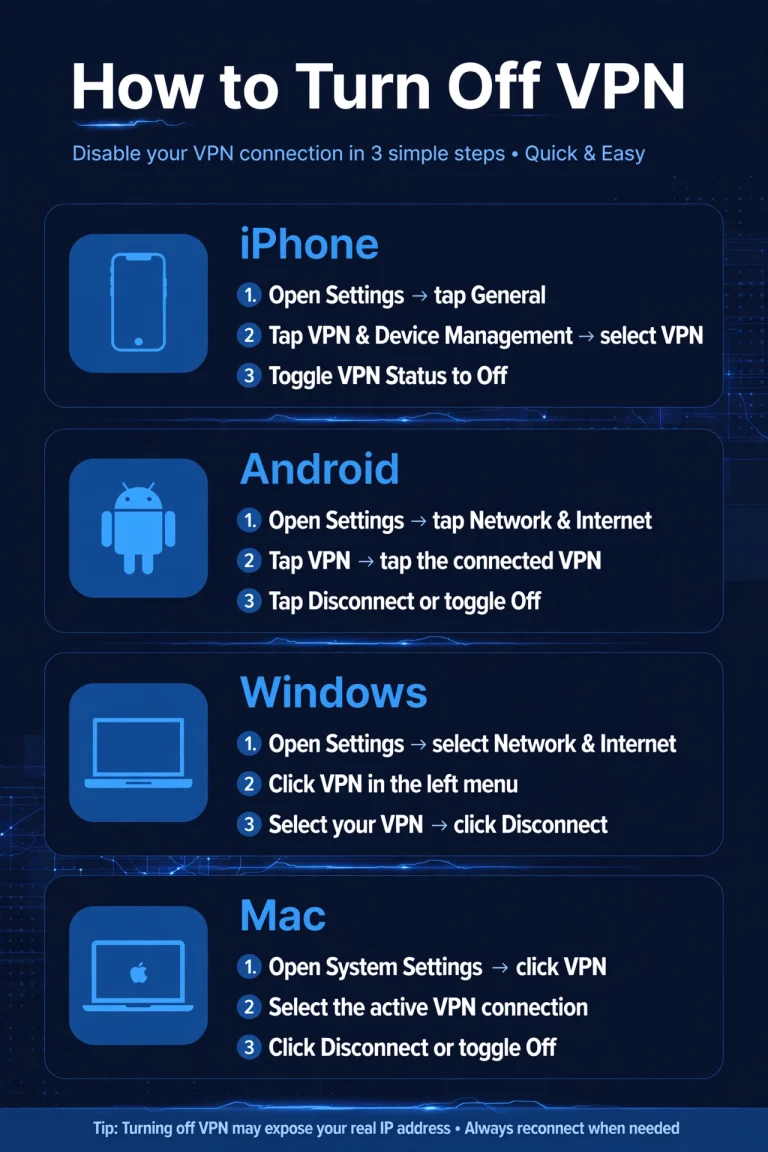
Travelers, note: opening files on cafe or airport Wi-Fi exposes your connection too. A VPN encrypts it; read our proxy vs VPN comparison to pick the right tool. At home you may prefer the VPN off for full upload speed, so here is how to turn off VPN on iPhone, Android, Windows, and Mac.
What Is Cloud Storage vs an External Hard Drive?
The real question behind what is cloud storage versus a hard drive is about trade-offs, and many careful people use both. Here is the comparison.
Access. Cloud storage wins: your files are available on any device with internet, anywhere. A drive only works when physically plugged into the computer in front of you.
Backup. Cloud backup is automatic and continuous. A drive only protects you if you remember to plug it in, which most people do far less often than planned.
Sharing. Cloud storage shares a file with a link in seconds. A hard drive means handing physical hardware to someone or mailing it.
Cost. A drive is a one-time purchase; cloud storage is usually a free tier plus a monthly subscription for more space. Over years, the subscription can cost more than the drive.
Privacy and control. A drive in your drawer never leaves your hands. Cloud storage means trusting a company with your files, which is why the provider’s reputation and your security habits matter.
A sensible setup uses both: a drive for monthly full-system backups, cloud storage for daily files. One failure on either side then never costs you everything.
Note
Free plans are useful but limited, usually 5 to 15 GB. That covers documents but fills fast with video. Check the over-limit terms and the next tier’s price before you need the space.
How to Choose the Right Cloud Storage Plan
Before you decide, think about what cloud storage means for you personally: a photo vault, a work tool, or a family archive. Then follow these steps:
- Estimate your space. Documents barely count, photos add up, videos eat gigabytes. Check your phone’s photo library size for a realistic number.
- List your devices. Make sure the service has solid apps for every device you own, including family phones if you plan to share.
- Decide how you share. Occasional links need far less than daily team collaboration, which calls for business-style features.
- Start with the free tier. Test the apps on real files for a week before paying. Annoying now means more annoying later.
- Check the upgrade price, not just the free gigabytes. The cost of the first paid jump matters far more than whether the free tier is 5 or 15 GB.
Getting Started With Cloud Storage in 5 Steps
Now that you know what is cloud storage, the actual setup takes less than 30 minutes, and most of it runs itself afterward:
- Pick a service with a free tier. Any major provider works fine for learning the ropes.
- Create your account and turn on two-factor authentication. Do this before uploading anything important, not after.
- Install the app on your phone and your computer. This is what makes syncing automatic instead of manual.
- Turn on automatic photo backup. This single switch protects years of memories with zero ongoing effort.
- Make a simple folder system and share one folder with a friend, learning how links and permissions work before you need them for something important.
What Is Cloud Storage? Frequently Asked Questions
Is cloud storage really free?
Free tiers are real and useful, typically 5 to 15 GB, plenty for documents and a modest photo collection. What is cloud storage pricing beyond that? Paid plans add far more space plus longer version history, usually from a few dollars per month.
What is the difference between cloud storage and Google Drive?
There is no difference in kind: Google Drive is an example of cloud storage, not an alternative. “Cloud storage vs Google Drive” is like “vehicles vs Toyota”: Drive is simply one popular service built on the idea this guide explains.
Can I lose files I store in the cloud?
Hardware failure is very unlikely, since providers copy files across servers. The realistic risks are forgetting your password without recovery options or getting locked out. Keep your recovery email current and irreplaceable files in two places.
What is cloud storage vs cloud backup?
A common mix-up. What is cloud storage vs cloud backup comes down to purpose: storage syncs files you actively use across devices, while backup automatically copies everything for disaster recovery. Many benefit from both.
How much cloud storage do I need?
Documents and email need little; even 5 GB lasts long. Add photos and 15 to 50 GB feels comfortable; heavy video needs 100 GB or more. Start free, watch usage for a month, then buy only what you fill.
Can the storage company read my files?
Technically most providers could, since they hold the encryption keys. In practice, reputable companies run strict internal controls. If it worries you, choose zero-knowledge encryption where only you hold the key, and read the privacy policy first.
Final Thoughts
What is cloud storage is no longer a mystery: your files, safe on guarded computers, available on every device, backed up without thought. Start free, turn on two-factor authentication, enable automatic photo backup. In a week, you will wonder how you managed files the old way.