8 Best AI Video Editing Tools in 2026: Edit Videos Like a Pro
Quick Answer: The best AI video editing tools in 2026 combine smart automation with real creative control. Descript leads for text-based editing, CapCut is the best free option, and Adobe Premiere Pro remains the pro choice with Firefly AI built in. Read on for full reviews of all 8 picks, pricing, and a side-by-side comparison table.
Editing video used to mean long hours of scrubbing timelines, cutting pauses, and syncing captions by hand. Not anymore. In 2026, a new wave of AI video editors can transcribe your footage, remove filler words, generate captions, reframe shots for vertical platforms, and even create a script from scratch. We tested the leading options to find the ones actually worth your time and money.
If you also want to create footage from nothing, check out our guide to AI video generation tools, which covers text-to-video platforms that pair well with the editors below.
1. Descript: Best for Text-Based Editing
Verdict: Descript turns video editing into document editing. It transcribes your footage, and you edit the video simply by editing the text. Delete a sentence and the corresponding video clip disappears. It is the fastest way to turn raw talking-head footage into a polished final cut.
- Edit video by editing the transcript, just like a Word document
- One-click removal of filler words like “um” and “uh,” plus silent pauses
- Overdub voice cloning creates realistic AI voiceovers in your own voice
- Studio Sound removes background noise and echo automatically
- Automatic captions, translations, and multi-track podcast editing
Pricing: Free plan with limited transcription hours; Creator starts at around $12 per month, Pro at around $24 per month when billed annually.
Best for: YouTubers, podcasters, and course creators who record lots of talking-head content. Visit Descript
2. CapCut: Best Free AI Video Editor
Verdict: CapCut packs an almost unbelievable amount of AI power into a free editor. Auto captions with animated styles, background removal without a green screen, AI upscaling, and script-to-video generation make it the obvious starting point for beginners and short-form creators.
- Auto captions in dozens of languages with trendy animated styles
- AI background remover, object removal, and video upscaler
- Script-to-video and text-to-speech with natural AI voices
- Auto reframe converts horizontal video to vertical for TikTok and Reels
- Huge built-in library of templates, effects, and royalty-free music
Pricing: Free with generous limits; CapCut Pro is around $8 per month for cloud storage, premium effects, and no watermarks on some exports.
Best for: TikTok and Reels creators, students, and anyone who wants powerful editing for free. Visit CapCut
3. Adobe Premiere Pro: Best for Professionals
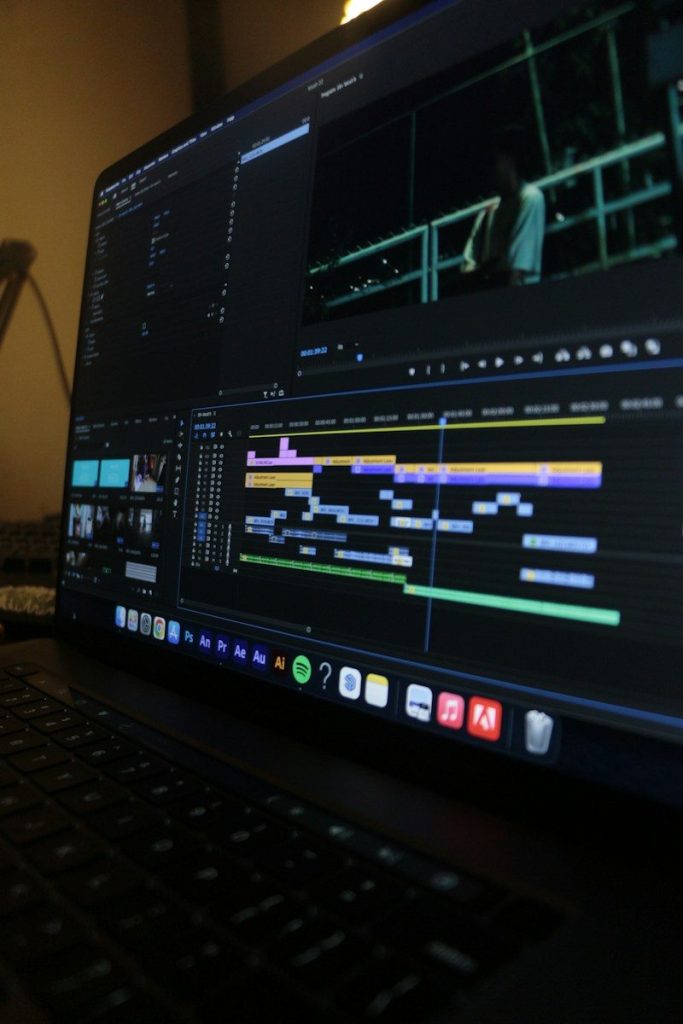
Verdict: Premiere Pro is still the industry standard for serious video work, and Adobe Firefly AI features have made it dramatically faster. Text-based editing, generative extend, and AI audio cleanup bring modern automation to a pro-grade timeline.
- Text-based editing: cut and rearrange clips by editing the transcript
- Generative Extend fills gaps in audio and video with Firefly AI
- Enhance Speech removes noise and clarifies dialogue in one click
- Scene Edit Detection and auto reframe for multi-platform delivery
- Deep integration with After Effects, Photoshop, and the Creative Cloud
Pricing: Around $23 per month for the single-app plan; included in the full Creative Cloud bundle.
Best for: Professional editors, agencies, and filmmakers who need full creative control plus AI speed boosts. Visit Adobe Premiere Pro
4. Runway: Best for AI Creative Effects
Verdict: Runway is the creative playground of AI video. Beyond solid editing basics, its generative models can restyle footage, remove objects, extend scenes, and generate video from text prompts. If your goal is visuals that stand out, nothing else matches it.
- Text-to-video and image-to-video generation with Gen models
- Magic Tools: inpainting, background removal, slow motion, and upscaling
- Motion brush lets you animate specific parts of a still image
- Green screen removal and automatic beat-synced editing
- Real-time collaboration for teams
Pricing: Free plan with limited credits; Standard is around $12 per user per month, Pro around $28 per user per month.
Best for: Creative professionals, marketers, and anyone making scroll-stopping visual content. Visit Runway
5. Pictory: Best for Turning Scripts Into Videos
Verdict: Pictory is built for one job and does it well: paste a script or blog post and get a finished video with stock footage, AI voiceover, captions, and music. It is ideal for content marketers who need volume without a film crew.
- Script-to-video with automatic scene matching from stock libraries
- Blog-to-video converts articles into narrated videos automatically
- AI voiceovers in multiple languages and natural-sounding tones
- Auto captions, silence trimming, and highlight reels from long videos
- Brand kits keep fonts, colors, and logos consistent
Pricing: Starter around $25 per month, Professional around $49 per month; annual billing saves roughly 20 percent.
Best for: Marketers, bloggers, and businesses repurposing written content into video at scale. Visit Pictory
6. Synthesia: Best for AI Avatar Videos
Verdict: Synthesia skips the camera entirely. Type a script, pick an AI avatar, and get a professional-looking presenter video in minutes. Training videos, product explainers, and multilingual content become trivially easy.
- 230+ realistic AI avatars with natural gestures and expressions
- Video translation and dubbing in 140+ languages with lip sync
- Create a personal avatar from a short recording of yourself
- Ready-made templates for training, onboarding, and sales
- Team workspaces with review and approval workflows
Pricing: Starter around $29 per month; Creator and Enterprise plans add personal avatars and higher video minutes.
Best for: Corporate training teams, HR departments, and creators who want presenter videos without filming. Visit Synthesia
7. InVideo: Best for Fast Social Videos
Verdict: InVideo combines a huge template library with AI generation to produce social-ready videos in minutes. Describe your idea, and its AI builds a draft with script, voiceover, footage, and music that you can then fine-tune.
- AI text-to-video from a simple prompt or full script
- 5,000+ templates for YouTube, ads, Reels, and presentations
- AI voice cloning and multilingual voiceovers
- Auto captions, background remover, and voice-activated editing commands
- Direct publishing to social platforms
Pricing: Free plan with watermark; Plus around $28 per month, Max around $48 per month for higher generation limits.
Best for: Social media managers and small businesses producing frequent promotional videos. Visit InVideo
8. Opus Clip: Best for Repurposing Long Videos
Verdict: Opus Clip watches your long videos and finds the moments most likely to go viral, then cuts them into vertical shorts with captions, emojis, and hooks. It is the shortcut for turning one podcast or webinar into a week of short-form content.
- AI finds the most engaging clips and scores their viral potential
- Auto reframing keeps the speaker centered in vertical format
- Animated captions with keyword highlighting
- AI-generated hooks, titles, and posting schedules
- Brand templates and team collaboration features
Pricing: Free trial with limited processing minutes; Starter around $19 per month, Pro around $29 per month.
Best for: Podcasters, streamers, and YouTubers repurposing long-form content into Shorts, Reels, and TikToks. Visit Opus Clip
Quick Comparison Table
| Tool | Best For | Standout AI Feature | Starting Price |
|---|---|---|---|
| Descript | Text-based editing | Edit video by editing the transcript | Free; paid from ~$12/mo |
| CapCut | Free editing | Auto captions and background removal | Free; Pro ~$8/mo |
| Adobe Premiere Pro | Professionals | Firefly generative extend | ~$23/mo |
| Runway | Creative effects | Text-to-video generation | Free; paid from ~$12/mo |
| Pictory | Script to video | Blog post to narrated video | ~$25/mo |
| Synthesia | AI avatar videos | 140+ language avatar dubbing | ~$29/mo |
| InVideo | Fast social videos | Prompt-to-video with templates | Free; paid from ~$28/mo |
| Opus Clip | Repurposing long video | Viral-moment detection for Shorts | Free trial; ~$19/mo |
How to Choose the Right AI Video Editing Tools
Start with your content type. Talking-head creators get the most from text-based editors like Descript, while short-form creators should begin with CapCut or Opus Clip. If you never want to appear on camera, Synthesia or Pictory remove filming from the equation entirely.
Next, weigh automation against control. AI generators like InVideo and Pictory are fastest, but a traditional timeline like Premiere Pro gives you frame-level precision when it matters. Many creators use both: AI for the rough cut, a timeline editor for the final polish.
Finally, check the pricing math against your output. A free plan is plenty for experimenting, but watermarks and monthly minute caps become expensive bottlenecks once you publish weekly. Pick the tool whose paid tier matches the volume you actually plan to produce, and take advantage of free trials before committing.
Frequently Asked Questions
An AI video editor uses machine learning to automate repetitive editing tasks. Common capabilities include speech-to-text transcription, automatic captioning, silence and filler-word removal, background noise cleanup, scene detection, auto reframing for different aspect ratios, and even generating footage or voiceovers from text. You still make the creative decisions; the AI handles the tedious parts.
Yes, for most beginners. CapCut’s free plan includes auto captions, background removal, and effects that rival paid software, and Descript and Runway both offer usable free tiers. Free plans usually limit export resolution, monthly processing minutes, or add watermarks, so upgrade once you start publishing regularly.
Descript is the top pick for most YouTubers because text-based editing makes cutting talking-head videos dramatically faster. If you produce cinematic or highly stylized content, Premiere Pro with Firefly AI gives you professional control. For YouTube Shorts, pair your workflow with Opus Clip to repurpose long videos automatically.
For simple content like talking-head videos, tutorials, and social clips, AI handles most of the work well. For storytelling, pacing, color grading, and complex narrative projects, a skilled human editor still makes a noticeable difference. The realistic sweet spot in 2026 is AI for the rough cut and cleanup, with human judgment on the final creative decisions.
CapCut and InVideo have full-featured mobile apps that are genuinely good for editing on the go. Descript, Premiere Pro, Runway, and Pictory are primarily desktop or browser-based, though some offer companion mobile apps. Opus Clip and Synthesia run in the browser, so they work on any device with a modern browser.
Reputable tools use encrypted uploads and standard data protection practices, but your footage does pass through their servers. Avoid uploading sensitive or confidential material to any cloud editor, read the privacy policy before signing up, and delete projects from the cloud once you have exported your final video.
Final Thoughts
The best AI video editing tools do not remove creativity from editing; they remove the busywork so you can focus on the story. Start with a free plan from CapCut or Descript, learn which AI features save you the most time, and upgrade only when your publishing schedule demands it. Pair your editor with other AI productivity tools and you will spend far less time editing and far more time creating.